Evolving Shopify’s marketing automations tool to be a fully automated, multi-channel marketing platform.
The process of defining key workflows, designing templates and reporting, and improving discovery so merchants could activate automations with ease.
DURATION
Jan ‘21 - May ‘23
SKILLS
UX Design, Prototyping, Presentation, Research
Platforms
Web, iOS, Android
MY ROLE
Designing for the marketing automations tool in Shopify
I joined the project from the very beginning and helped shape the foundation of what Marketing Automations is today.
My work included defining core workflows, designing email templates, building reporting pages, and improving discovery inside the Shopify admin so merchants could easily find and activate their automations.


Marketing in Shopify
Marketing in Shopify was an under-utilized tool for Merchants, as they would often use third-party app instead.
Running a business on Shopify meant wearing a dozen hats at once. For many merchants, marketing was the one that weighed them down, from sending emails to keeping track of every follow up. Every missed moment meant missed sales.
Our Marketing Automations journey started with a simple goal. Take that weight off merchants and let their marketing work quietly in the background.
The project started with a simple idea. Shopify’s Marketing Automations tool already had powerful tools like Shopify Email, but it was primarily used for marketing tactics via partnered apps, like Facebook and Google.
Merchants used the tool to send one-off campaigns, but nothing connected the dots. Everything required manual effort and constant attention.

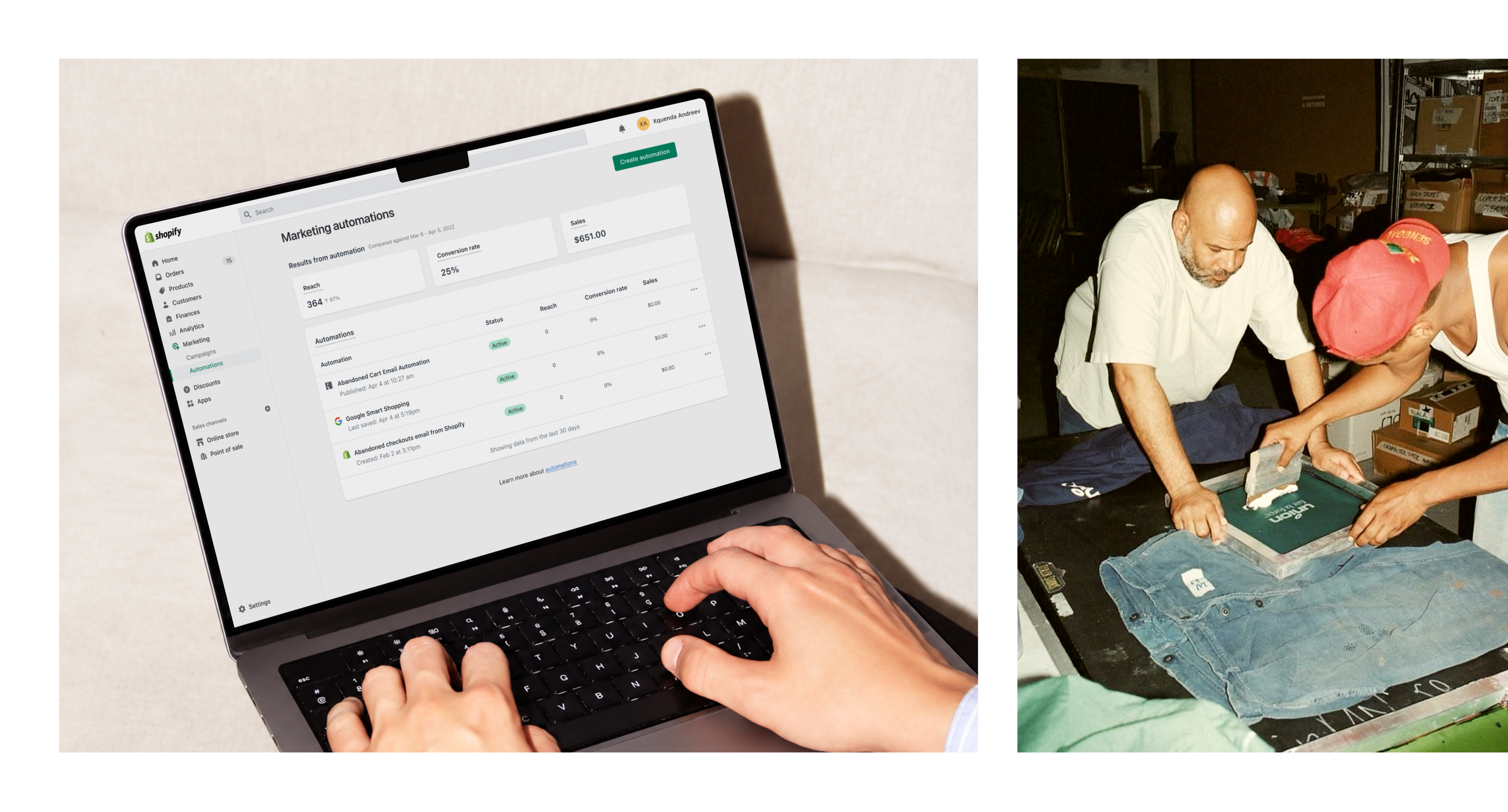
Previous Experience
Merchants would have to either send manual emails with Shopify, or use external tools, completely separating marketing out of Shopify.
Because Shopify did not yet offer a full automation platform, most merchants relied on outside tools like Klaviyo, Mailchimp, Seguno, and Omnisend.
These apps were powerful but came with extra costs and added complexity. Merchants had to switch between multiple tools just to send the right message at the right time.
With every tool living in its own world, merchants had no clear view of their marketing. We saw an opportunity to unify that experience and bring their entire marketing journey home to Shopify.

Marketing Automations tool was used for one-off emails, manual steps, and no sense of a complete customer journey.
Project’s Objective
Make Shopify the central place for managing marketing and allow merchants to automate marketing efforts.
Our goal was to create a centralized home for all merchant marketing. Build automations directly inside Shopify using first-party tools that were easy to set up and free to use.
Give merchants one place to run their campaigns, understand their customers, and track their sales without juggling multiple platforms.
Transforming Automations
Integrating Shopify’s Email app into Shopify’s Flow app
To build the automation behavior, we needed to combine our marketing tool, Shopify Email, with another tool within Shopify, the Flow app, with allows merchants to create automation workflows.
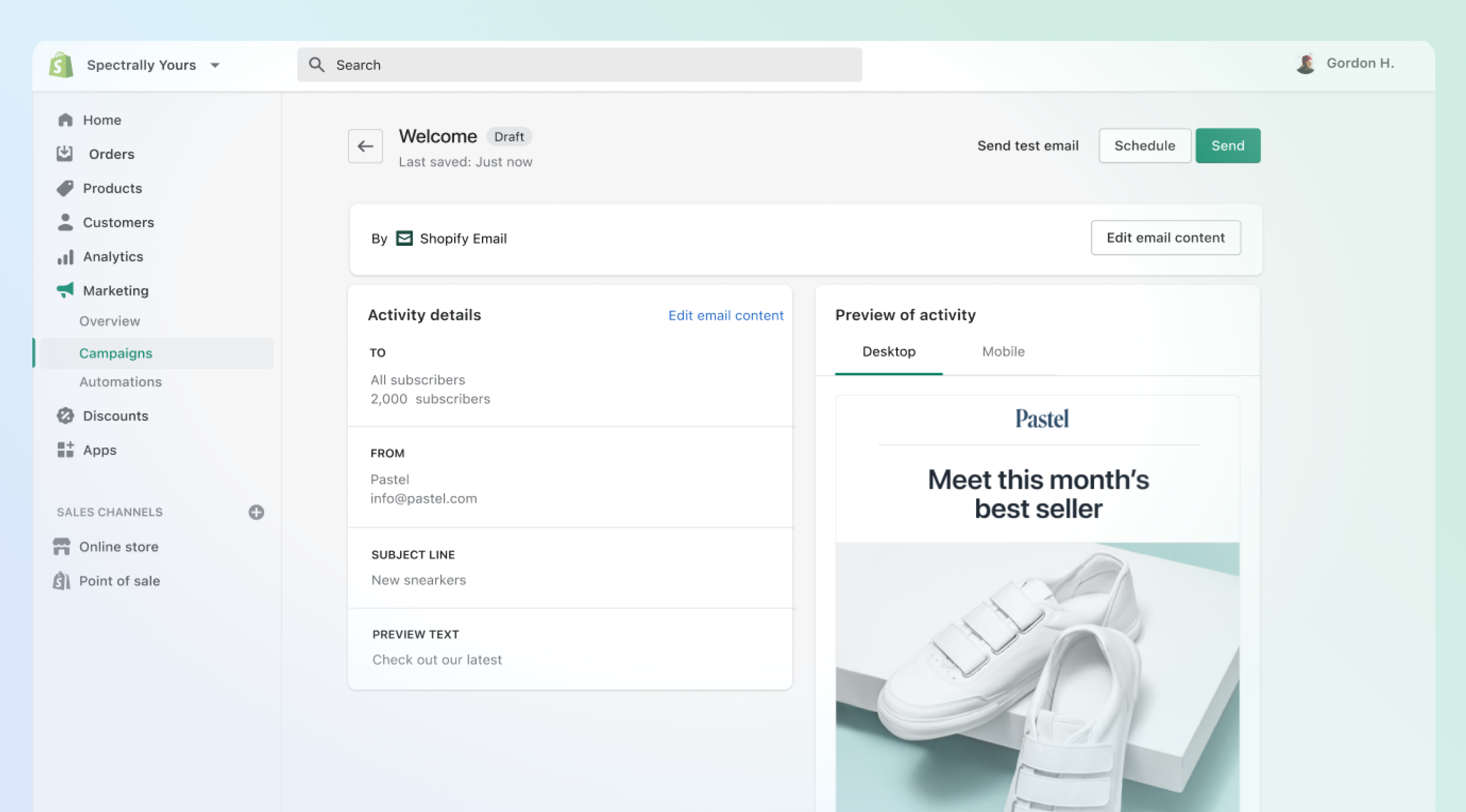
Shopify Email
Before Automations, Shopify Email was built for single campaigns. Merchants had to send every message themselves, one at a time.
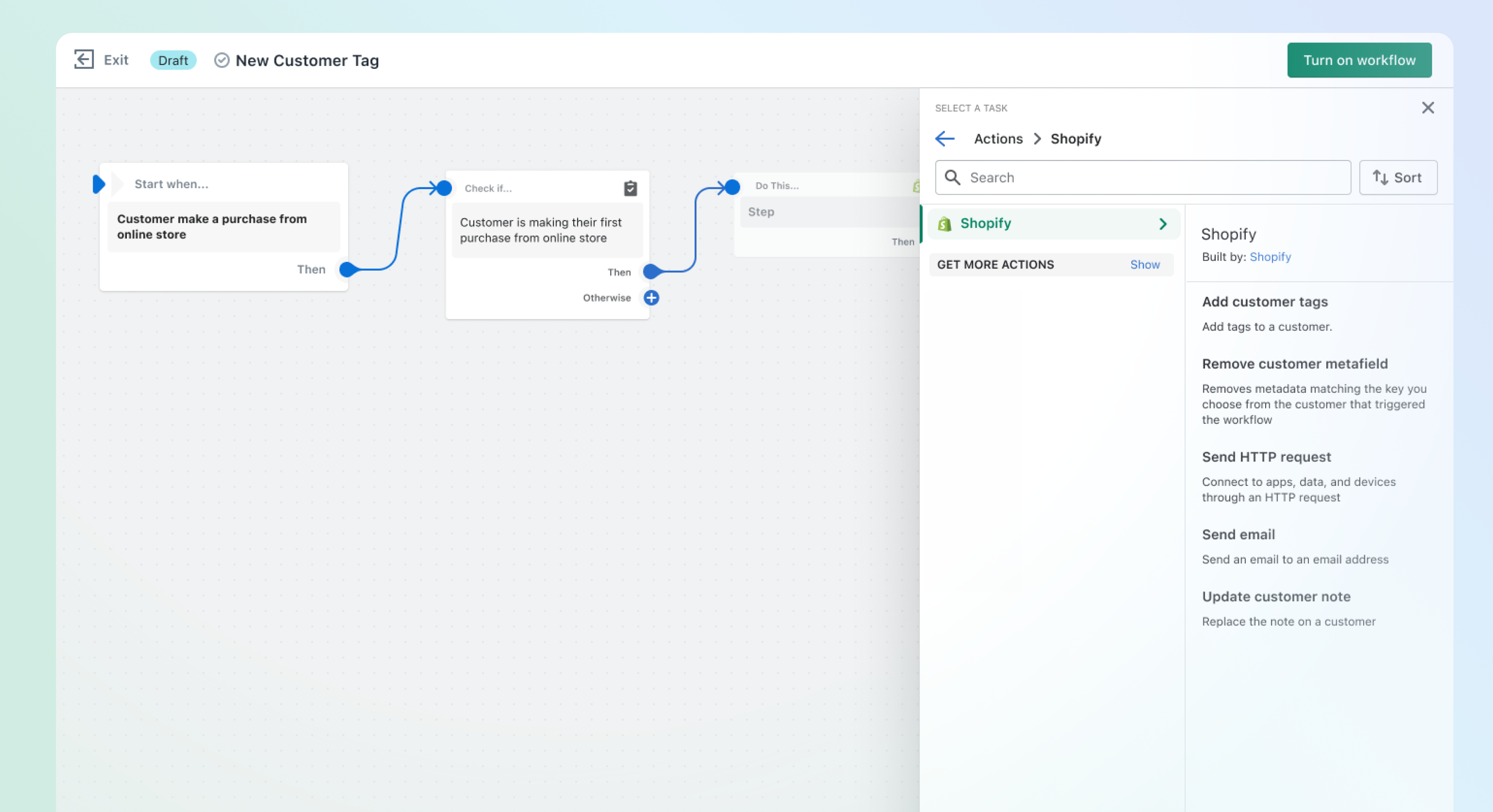
Shopify Flow
Originally reserved for Plus merchants, Flow was our automation engine, and it became the foundation for Marketing Automations.
By making Flow available to all merchants, we opened the door to accessible automation at scale.

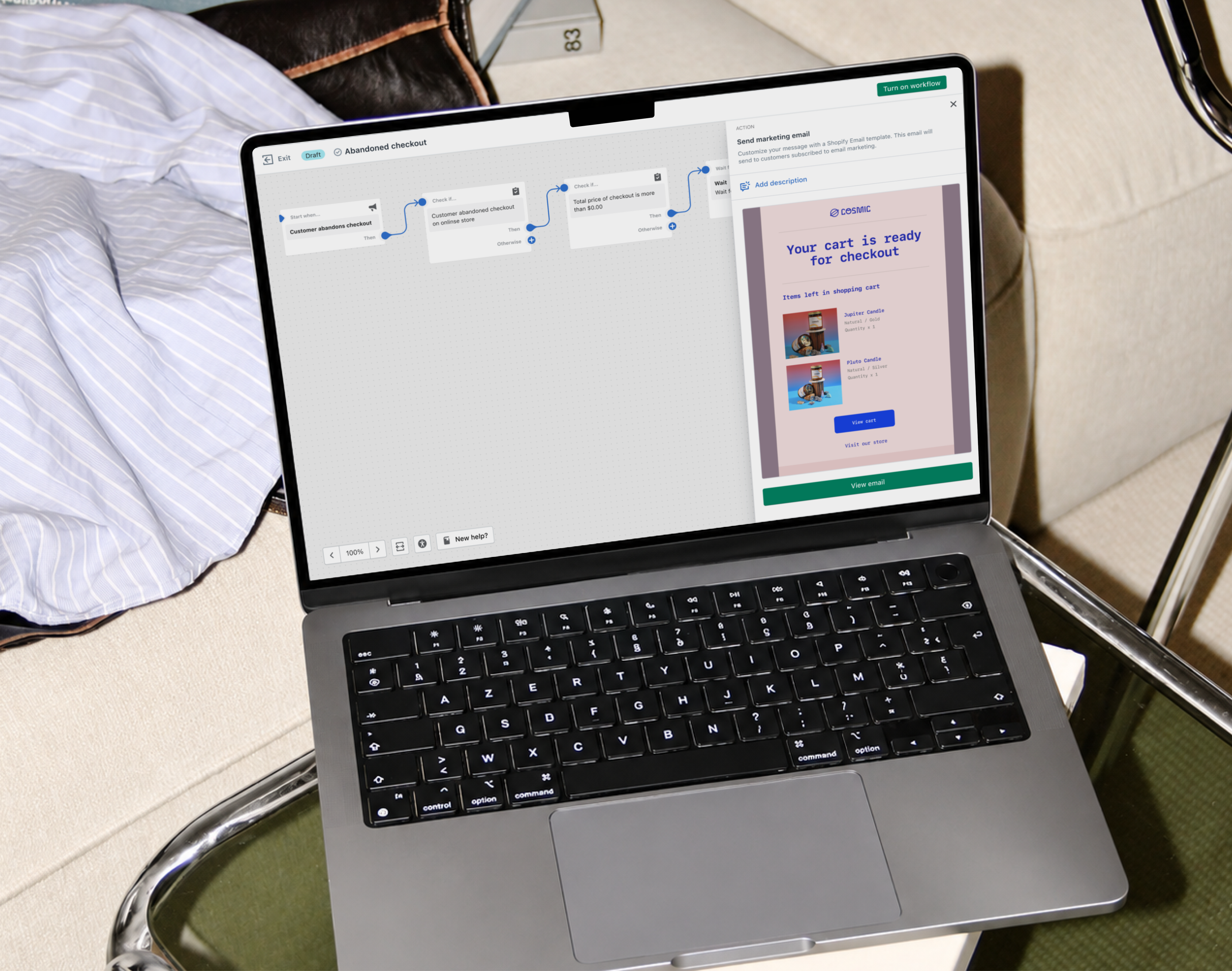
Shopify Email became the first channel integrated into Flow, unlocking automated email workflows inside Shopify.
Automation Templates
Building the automation templates page
The next step was making automation simple for everyone. We wanted merchants to set up powerful customer journeys without needing marketing experience or technical skill.


Email Templates
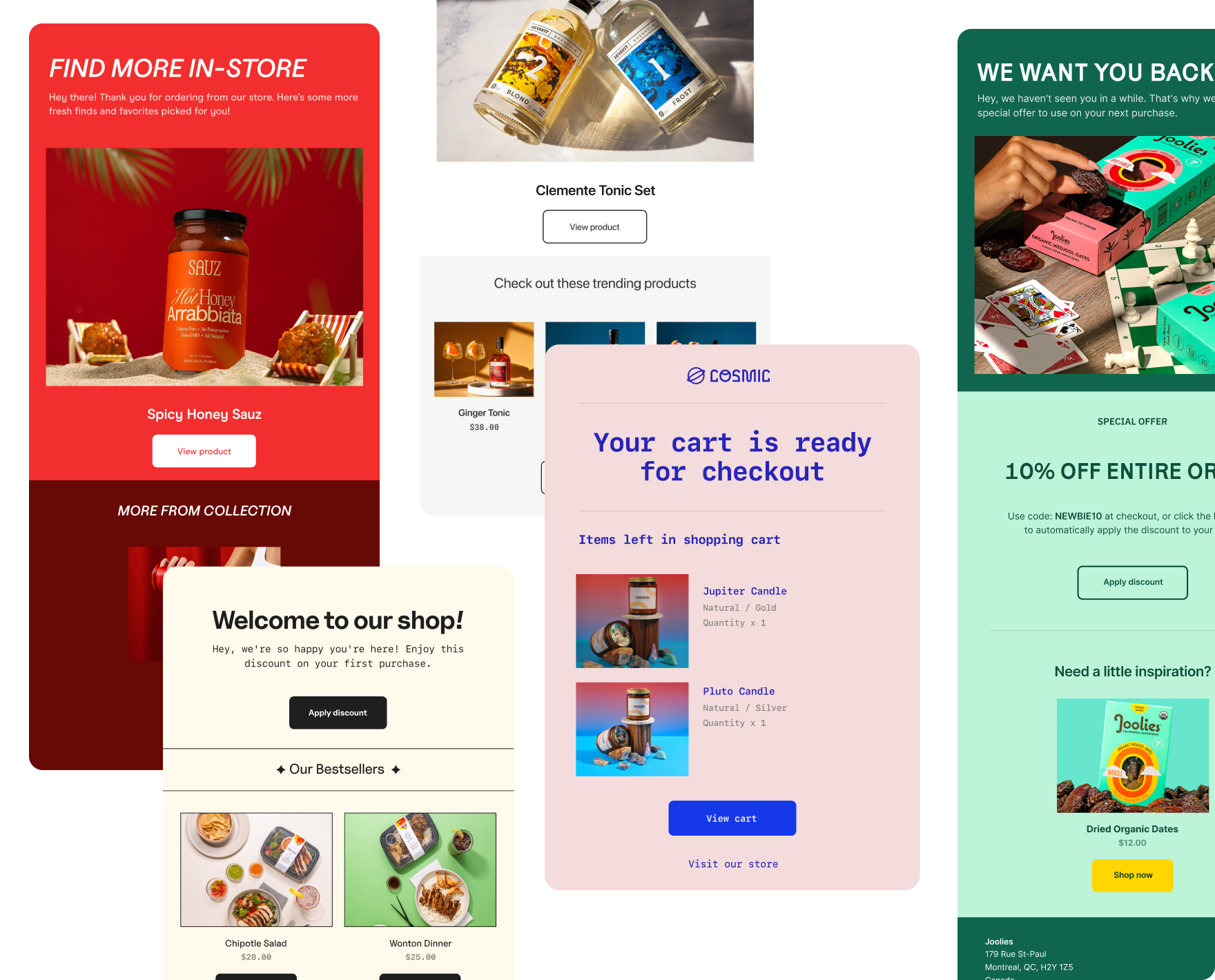
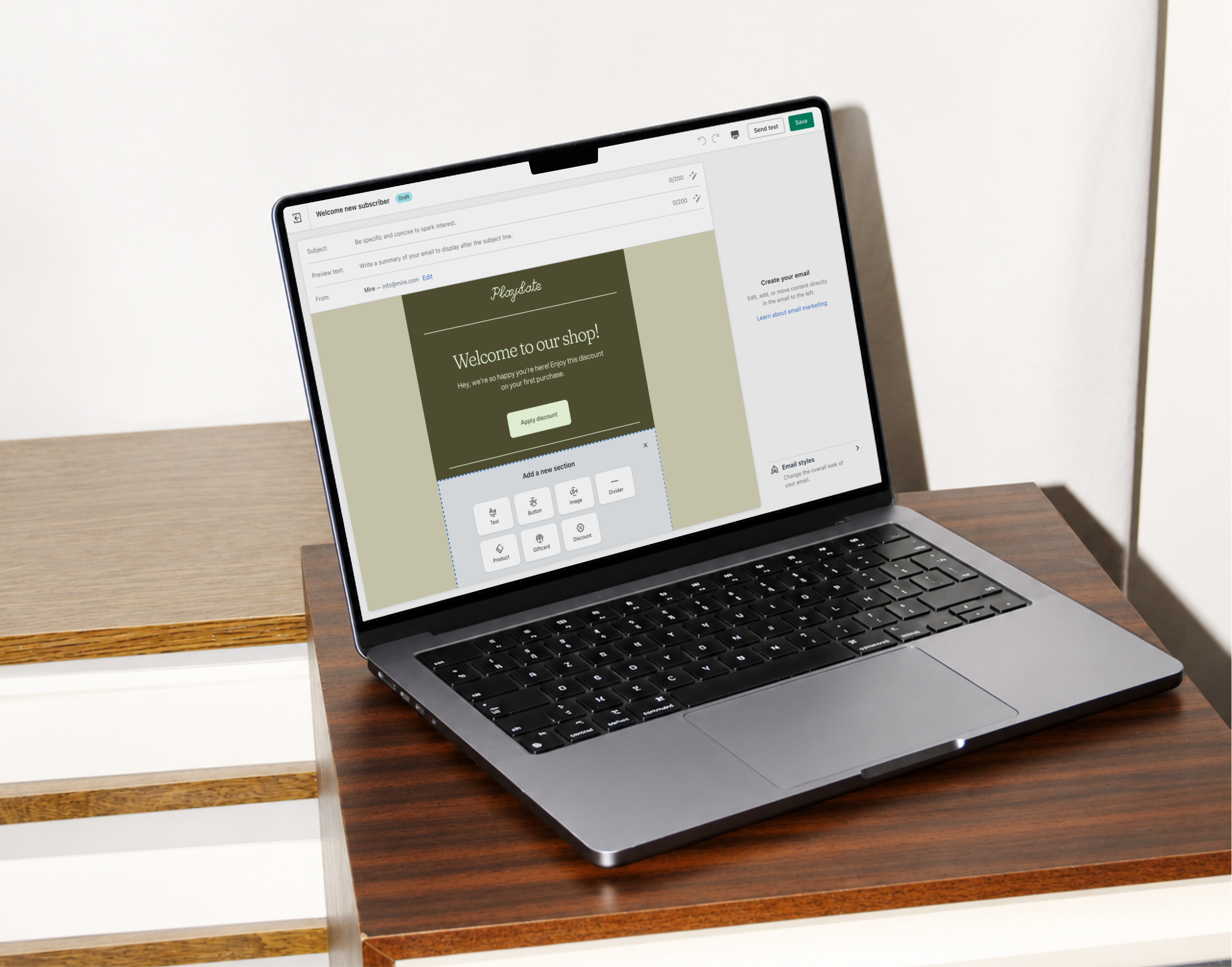
Each workflow came with matching email templates so merchants could customize and send polished messages instantly.

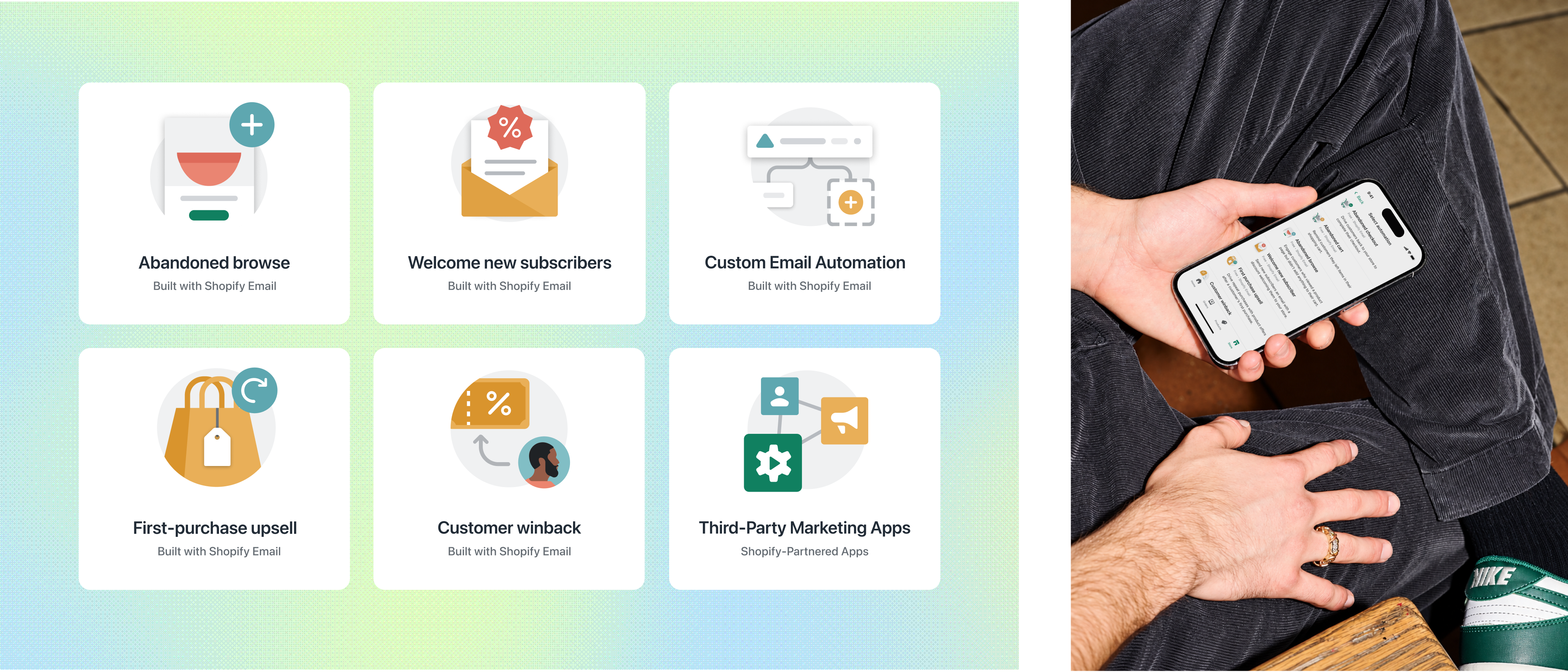
We created workflow templates that mapped to key moments in the customer journey, making setup fast and intuitive.
Templates Page
Automation templates allowed merchants to simply automation any automation with ease.
Together the pre-built, customizable automation and email templates allowed merchants to launch professional campaigns in minutes, no design background required.
Marketing Reports
Impactful reporting and edit workflow for active automations
Once merchants activated their automations, they needed more insight into how customers were responding.
We redesigned the reporting pages to highlight engagement and performance to give merchants insights on areas they could possibly improve.
Reporting Page
Comprehensive reporting to merchants target their efforts for optimization.
The redesigned reporting page provided a complete view of automation performance, including reach, sessions, and sales impact.
Along with reporting changes, we also upgraded the editing experience so merchants could quickly adjust workflows and emails based on what they saw in the data.
Merchants could edit their automation or email content directly from the reporting page to improve performance.
Expanding Automations
Third-party marketing app integration into the marketing automation tool
Once we had a solid suite of first-party automation templates in place, we broadened the platform by enabling integrations with third-party apps in Flow.
Now merchants could manage, customize, and track all their automations, first-party and third-party, directly in Shopify.
Discovering Automations
Reaching more merchants to marketing automations
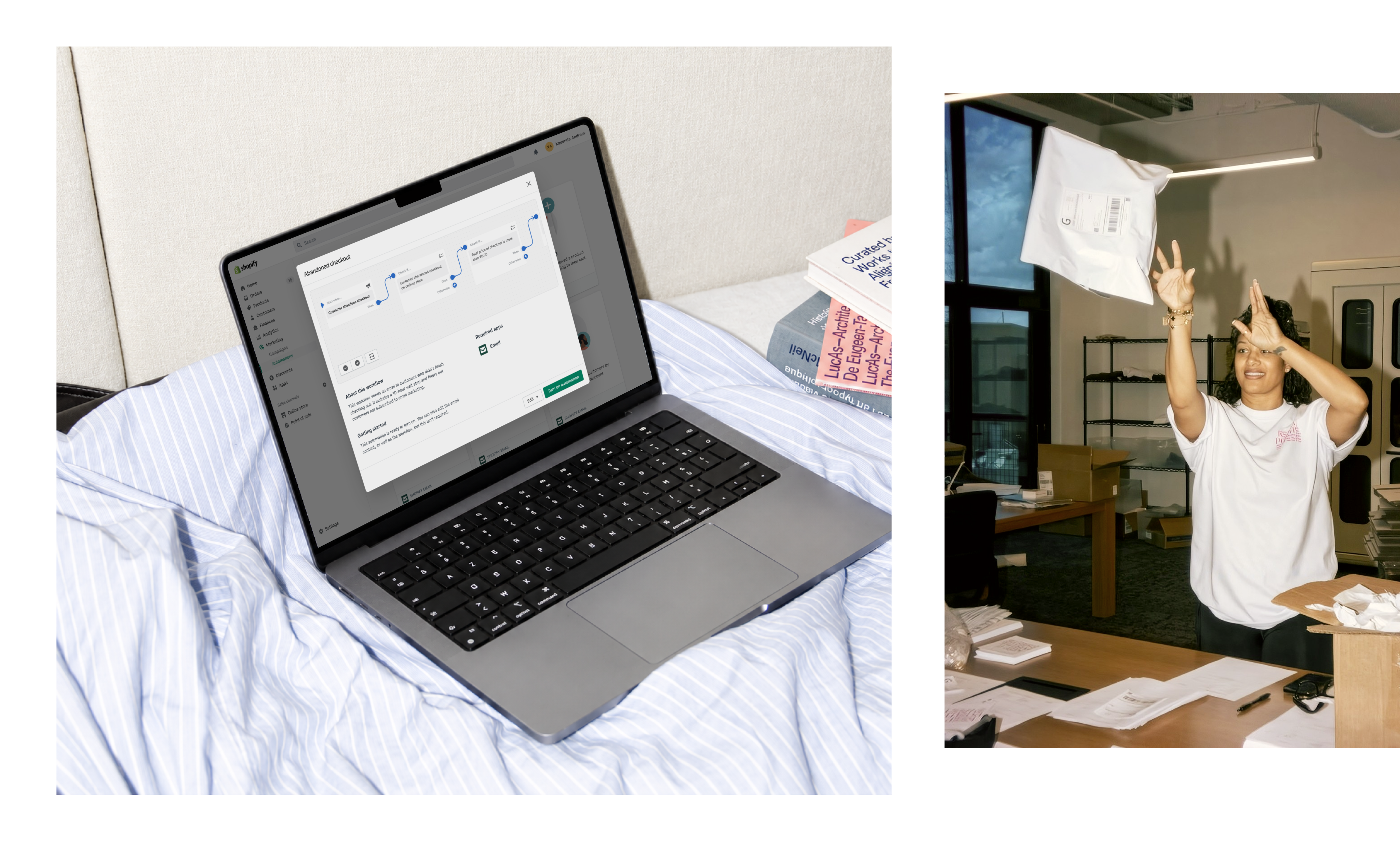
We redesigned the abandoned checkout experience, which had lived as a legacy setting for years.
By migrating it into the Marketing Automations platform and activating it by default for new merchants, we gave one of Shopify’s most valuable tools a modern home that was easier to use and easier to find.
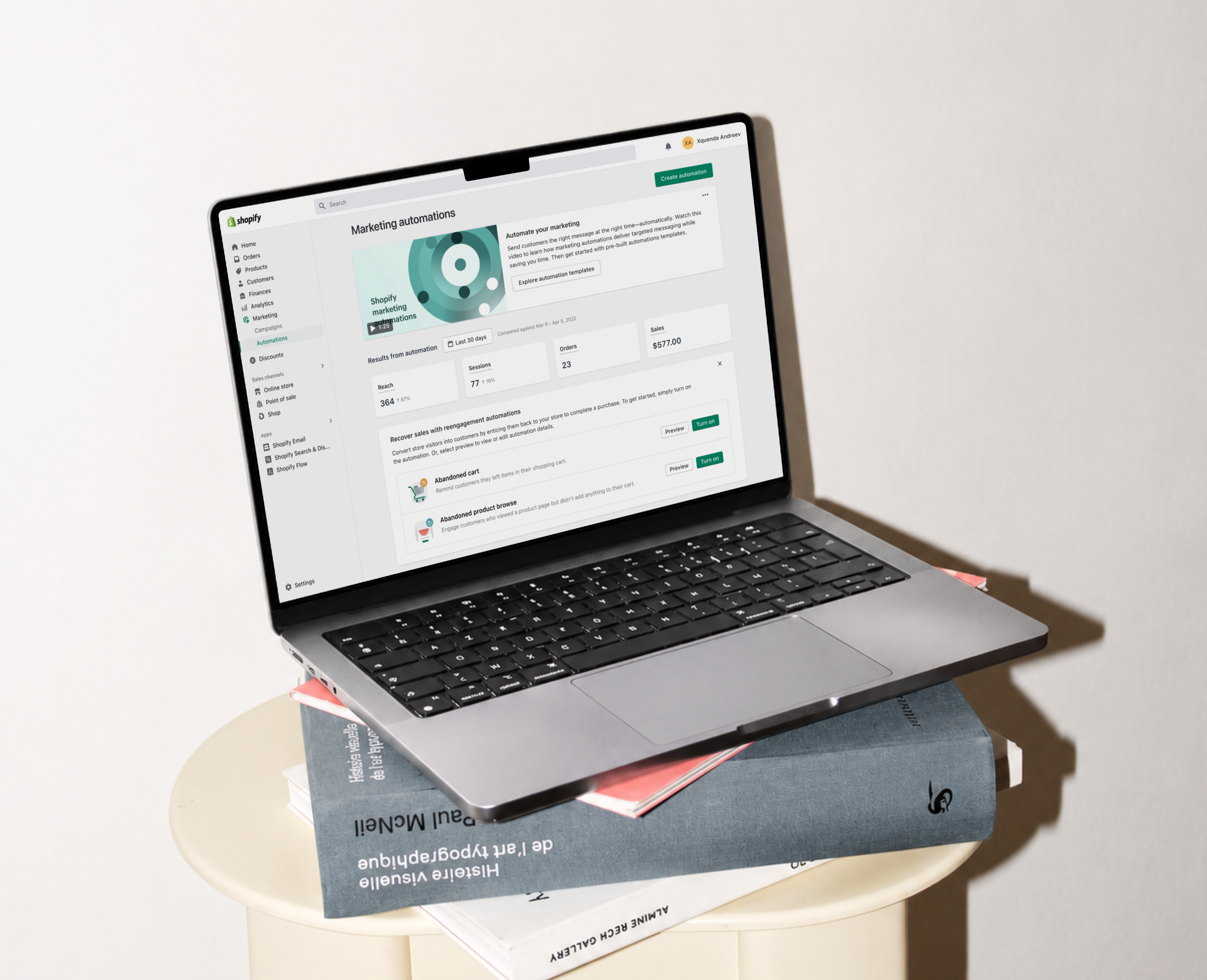
Discovery banners were used within the Marketing Automations page as well as other places within the Shopify app, like Abandoned Checkouts under Orders page.
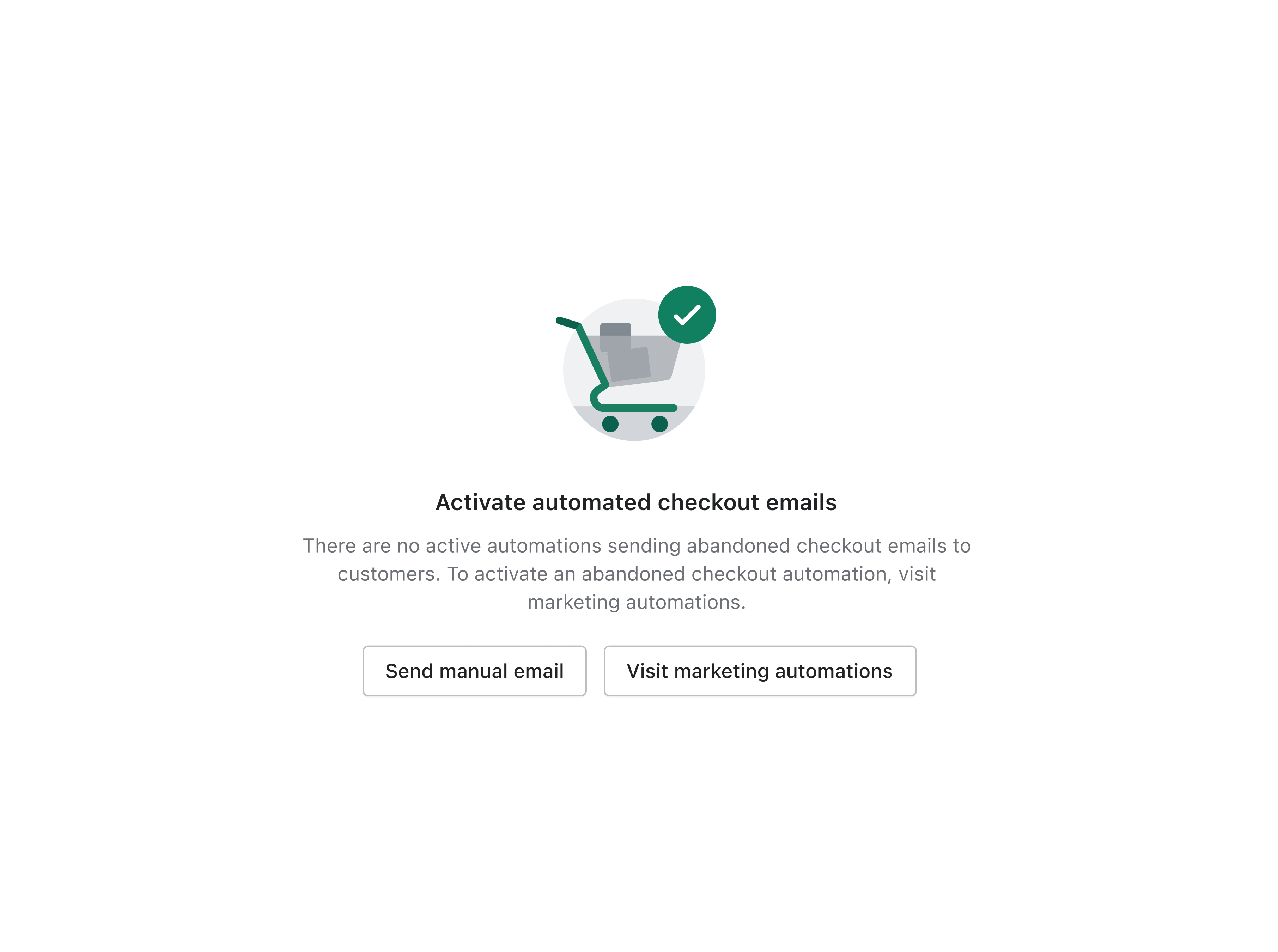
Activating Abandonment Automations
By surfacing abandoned checkout under Orders and linking it to the automations tool, we made it easier for merchants to discover and activate one of Shopify’s strongest revenue drivers.
When merchants visit their abandoned checkout under Orders, they can easily be redirected to the abandoned checkout automation from the page, giving them confidence that these abandoned orders are being worked back into a recovery workflow.
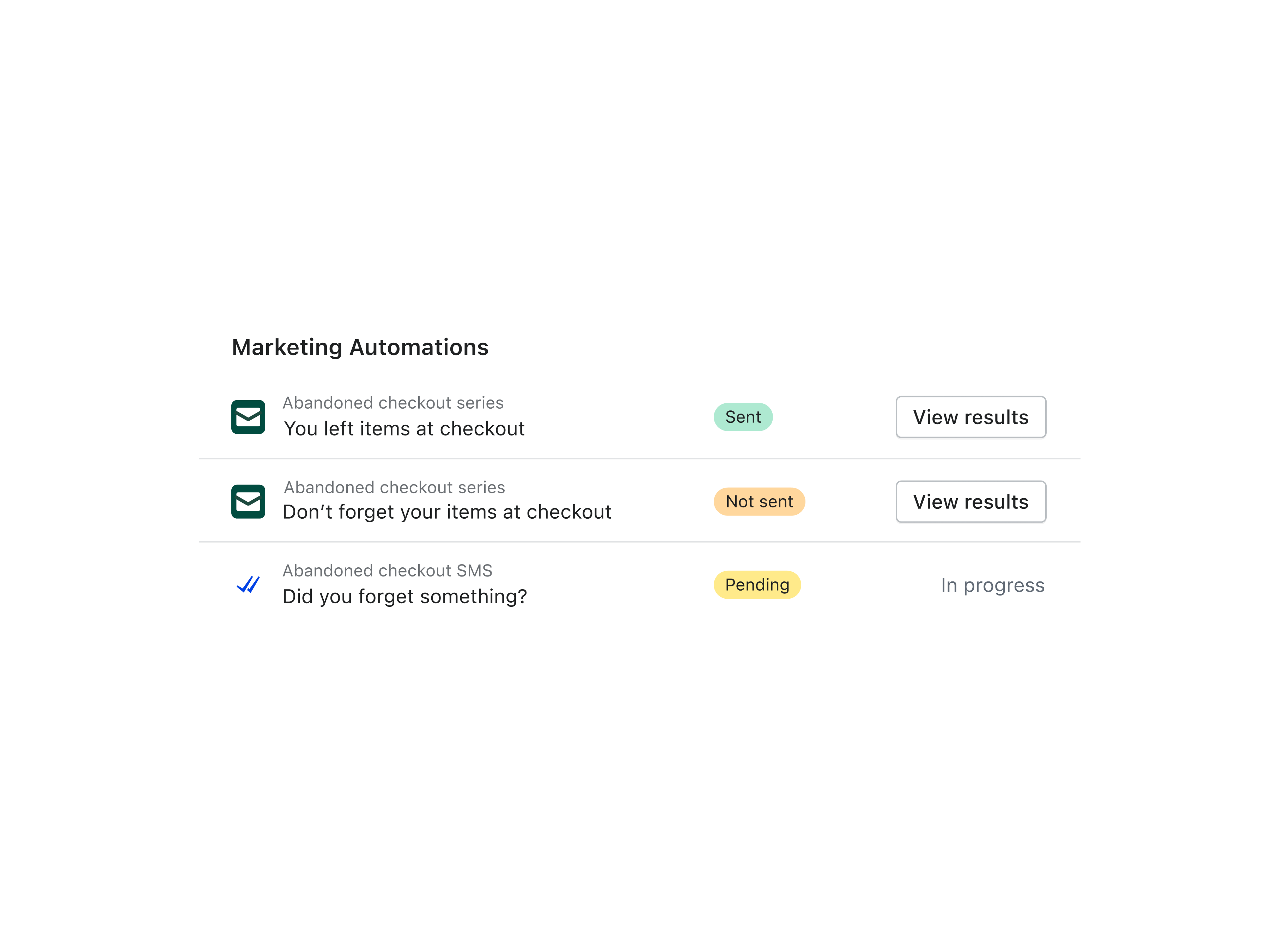
Managing Abandoned Checkouts
Once the abandoned checkout automation is activated, it unlocks detailed reporting and insights that were not available in the legacy version.
Merchants can access these performance metrics from the same abandoned checkouts page in Orders.
Impact & Results
Marketing automations ws a large scale overhaul that positively impacted merchants across Shopify
After the marketing automation platform was built, along with the third-party app integration feature and abandoned checkouts, this greatly increased the number of automations in Shopify.
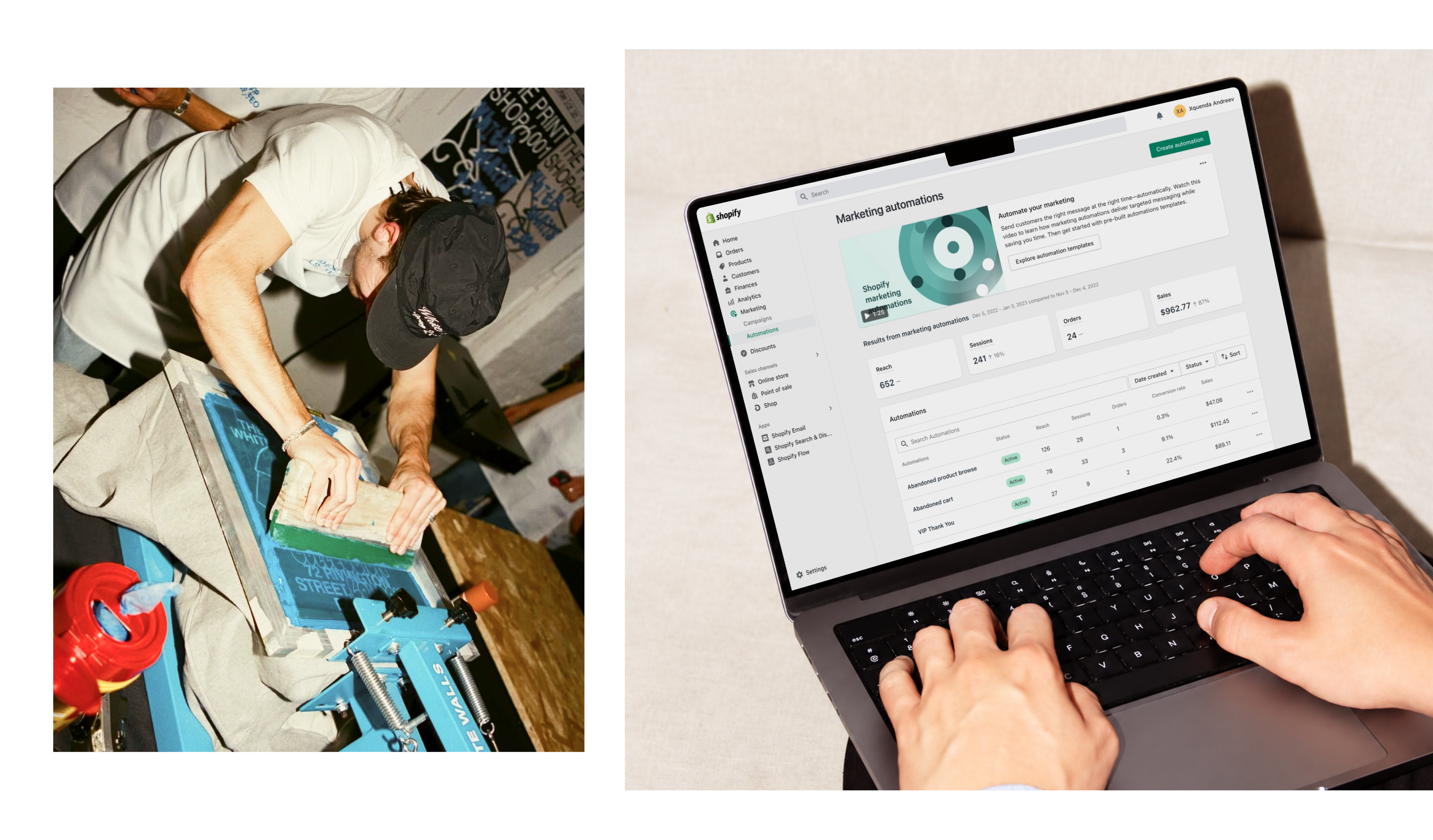
Today, Marketing Automations is used by over 750K merchants and is on track to serve all 2M businesses on Shopify. Across the platform, automations have contributed more than $1B in merchant sales.
© 2026
Back to top
Evolving Shopify’s marketing automations tool to be a fully automated, multi-channel marketing platform.
The process of defining key workflows, designing templates and reporting, and improving discovery so merchants could activate automations with ease.
DURATION
Jan ‘21 - May ‘23
SKILLS
UX Design, Prototyping, Presentation, Research
Platforms
Web, iOS, Android
MY ROLE
Designing for the marketing automations tool in Shopify
I joined the project from the very beginning and helped shape the foundation of what Marketing Automations is today.
My work included defining core workflows, designing email templates, building reporting pages, and improving discovery inside the Shopify admin so merchants could easily find and activate their automations.
Marketing in Shopify
Marketing in Shopify was an under-utilized tool for Merchants, as they would often use third-party app instead.
Running a business on Shopify meant wearing a dozen hats at once. For many merchants, marketing was the one that weighed them down, from sending emails to keeping track of every follow up. Every missed moment meant missed sales.
Our Marketing Automations journey started with a simple goal. Take that weight off merchants and let their marketing work quietly in the background.
The project started with a simple idea. Shopify’s Marketing Automations tool already had powerful tools like Shopify Email, but it was primarily used for marketing tactics via partnered apps, like Facebook and Google.
Merchants used the tool to send one-off campaigns, but nothing connected the dots. Everything required manual effort and constant attention.
Previous Experience
Merchants would have to either send manual emails with Shopify, or use external tools, completely separating marketing out of Shopify.
Because Shopify did not yet offer a full automation platform, most merchants relied on outside tools like Klaviyo, Mailchimp, Seguno, and Omnisend.
These apps were powerful but came with extra costs and added complexity. Merchants had to switch between multiple tools just to send the right message at the right time.
With every tool living in its own world, merchants had no clear view of their marketing. We saw an opportunity to unify that experience and bring their entire marketing journey home to Shopify.
Marketing Automations tool was used for one-off emails, manual steps, and no sense of a complete customer journey.
Project’s Objective
Make Shopify the central place for managing marketing and allow merchants to automate marketing efforts.
Our goal was to create a centralized home for all merchant marketing. Build automations directly inside Shopify using first-party tools that were easy to set up and free to use.
Give merchants one place to run their campaigns, understand their customers, and track their sales without juggling multiple platforms.
Transforming Automations
Integrating Shopify’s Email app into Shopify’s Flow app
To build the automation behavior, we needed to combine our marketing tool, Shopify Email, with another tool within Shopify, the Flow app, with allows merchants to create automation workflows.
Shopify Email
Before Automations, Shopify Email was built for single campaigns. Merchants had to send every message themselves, one at a time.
Shopify Flow
Originally reserved for Plus merchants, Flow was our automation engine, and it became the foundation for Marketing Automations.
By making Flow available to all merchants, we opened the door to accessible automation at scale.
Shopify Email became the first channel integrated into Flow, unlocking automated email workflows inside Shopify.
Automation Templates
Building the automation templates page
The next step was making automation simple for everyone. We wanted merchants to set up powerful customer journeys without needing marketing experience or technical skill.
Email Templates
Each workflow came with matching email templates so merchants could customize and send polished messages instantly.
We created workflow templates that mapped to key moments in the customer journey, making setup fast and intuitive.
Templates Page
Automation templates allowed merchants to simply automation any automation with ease.
Together the pre-built, customizable automation and email templates allowed merchants to launch professional campaigns in minutes, no design background required.
Marketing Reports
Impactful reporting and edit workflow for active automations
Once merchants activated their automations, they needed more insight into how customers were responding.
We redesigned the reporting pages to highlight engagement and performance to give merchants insights on areas they could possibly improve.
Reporting Page
Comprehensive reporting to merchants target their efforts for optimization.
The redesigned reporting page provided a complete view of automation performance, including reach, sessions, and sales impact.
Along with reporting changes, we also upgraded the editing experience so merchants could quickly adjust workflows and emails based on what they saw in the data.
Merchants could edit their automation or email content directly from the reporting page to improve performance.
Expanding Automations
Third-party marketing app integration into the marketing automation tool
Once we had a solid suite of first-party automation templates in place, we broadened the platform by enabling integrations with third-party apps in Flow.
Now merchants could manage, customize, and track all their automations, first-party and third-party, directly in Shopify.
Discovering Automations
Reaching more merchants to marketing automations
We redesigned the abandoned checkout experience, which had lived as a legacy setting for years.
By migrating it into the Marketing Automations platform and activating it by default for new merchants, we gave one of Shopify’s most valuable tools a modern home that was easier to use and easier to find.
Discovery banners were used within the Marketing Automations page as well as other places within the Shopify app, like Abandoned Checkouts under Orders page.
Activating Abandonment Automations
By surfacing abandoned checkout under Orders and linking it to the automations tool, we made it easier for merchants to discover and activate one of Shopify’s strongest revenue drivers.
When merchants visit their abandoned checkout under Orders, they can easily be redirected to the abandoned checkout automation from the page, giving them confidence that these abandoned orders are being worked back into a recovery workflow.
Managing Abandoned Checkouts
Once the abandoned checkout automation is activated, it unlocks detailed reporting and insights that were not available in the legacy version.
Merchants can access these performance metrics from the same abandoned checkouts page in Orders.
Impact & Results
Marketing automations ws a large scale overhaul that positively impacted merchants across Shopify
After the marketing automation platform was built, along with the third-party app integration feature and abandoned checkouts, this greatly increased the number of automations in Shopify.
Today, Marketing Automations is used by over 750K merchants and is on track to serve all 2M businesses on Shopify. Across the platform, automations have contributed more than $1B in merchant sales.
© 2026
Back to top
Evolving Shopify’s marketing automations tool to be a fully automated, multi-channel marketing platform.
The process of defining key workflows, designing templates and reporting, and improving discovery so merchants could activate automations with ease.
DURATION
Jan ‘21 - May ‘23
SKILLS
UX Design, Prototyping,
Presentation, Research
Platforms
Web, iOS, Android
MY ROLE
Designing for the marketing automations tool in Shopify
I joined the project from the very beginning and helped shape the foundation of what Marketing Automations is today.
My work included defining core workflows, designing email templates, building reporting pages, and improving discovery inside the Shopify admin so merchants could easily find and activate their automations.
Marketing in Shopify
Marketing in Shopify was an under-utilized tool for Merchants, as they would often use third-party app instead.
Running a business on Shopify meant wearing a dozen hats at once. For many merchants, marketing was the one that weighed them down, from sending emails to keeping track of every follow up. Every missed moment meant missed sales.
Our Marketing Automations journey started with a simple goal. Take that weight off merchants and let their marketing work quietly in the background.
The project started with a simple idea. Shopify’s Marketing Automations tool already had powerful tools like Shopify Email, but it was primarily used for marketing tactics via partnered apps, like Facebook and Google.
Merchants used the tool to send one-off campaigns, but nothing connected the dots. Everything required manual effort and constant attention.
Previous Experience
Merchants would have to either send manual emails with Shopify, or use external tools, completely separating marketing out of Shopify.
Because Shopify did not yet offer a full automation platform, most merchants relied on outside tools like Klaviyo, Mailchimp, Seguno, and Omnisend.
These apps were powerful but came with extra costs and added complexity. Merchants had to switch between multiple tools just to send the right message at the right time.
With every tool living in its own world, merchants had no clear view of their marketing. We saw an opportunity to unify that experience and bring their entire marketing journey home to Shopify.

Marketing Automations tool was used for one-off emails, manual steps, and no sense of a complete customer journey.
Project’s Objective
Make Shopify the central place for managing marketing and allow merchants to automate marketing efforts.
Our goal was to create a centralized home for all merchant marketing. Build automations directly inside Shopify using first-party tools that were easy to set up and free to use.
Give merchants one place to run their campaigns, understand their customers, and track their sales without juggling multiple platforms.
Transforming Automations
Integrating Shopify’s Email app into Shopify’s Flow app
To build the automation behavior, we needed to combine our marketing tool, Shopify Email, with another tool within Shopify, the Flow app, with allows merchants to create automation workflows.
Shopify Email
Before Automations, Shopify Email was built for single campaigns. Merchants had to send every message themselves, one at a time.
Shopify Flow
Originally reserved for Plus merchants, Flow was our automation engine, and it became the foundation for Marketing Automations.
By making Flow available to all merchants, we opened the door to accessible automation at scale.
Shopify Email became the first channel integrated into Flow, unlocking automated email workflows inside Shopify.
Automation Templates
Building the automation templates page
The next step was making automation simple for everyone. We wanted merchants to set up powerful customer journeys without needing marketing experience or technical skill.
Email Templates
Each workflow came with matching email templates so merchants could customize and send polished messages instantly.
We created workflow templates that mapped to key moments in the customer journey, making setup fast and intuitive.
Templates Page
Automation templates allowed merchants to simply automation any automation with ease.
Together the pre-built, customizable automation and email templates allowed merchants to launch professional campaigns in minutes, no design background required.
Marketing Reports
Impactful reporting and edit workflow for active automations
Once merchants activated their automations, they needed more insight into how customers were responding.
We redesigned the reporting pages to highlight engagement and performance to give merchants insights on areas they could possibly improve.
Reporting Page
Comprehensive reporting to merchants target their efforts for optimization.
The redesigned reporting page provided a complete view of automation performance, including reach, sessions, and sales impact.
Along with reporting changes, we also upgraded the editing experience so merchants could quickly adjust workflows and emails based on what they saw in the data.
Merchants could edit their automation or email content directly from the reporting page to improve performance.
Expanding Automations
Third-party marketing app integration into the marketing automation tool
Once we had a solid suite of first-party automation templates in place, we broadened the platform by enabling integrations with third-party apps in Flow.
Now merchants could manage, customize, and track all their automations, first-party and third-party, directly in Shopify.
Discovering Automations
Reaching more merchants to marketing automations
We redesigned the abandoned checkout experience, which had lived as a legacy setting for years.
By migrating it into the Marketing Automations platform and activating it by default for new merchants, we gave one of Shopify’s most valuable tools a modern home that was easier to use and easier to find.
Discovery banners were used within the Marketing Automations page as well as other places within the Shopify app, like Abandoned Checkouts under Orders page.
Activating Abandonment Automations
By surfacing abandoned checkout under Orders and linking it to the automations tool, we made it easier for merchants to discover and activate one of Shopify’s strongest revenue drivers.
When merchants visit their abandoned checkout under Orders, they can easily be redirected to the abandoned checkout automation from the page, giving them confidence that these abandoned orders are being worked back into a recovery workflow.
Managing Abandoned Checkouts
Once the abandoned checkout automation is activated, it unlocks detailed reporting and insights that were not available in the legacy version.
Merchants can access these performance metrics from the same abandoned checkouts page in Orders.
Impact & Results
Marketing automations ws a large scale overhaul that positively impacted merchants across Shopify
After the marketing automation platform was built, along with the third-party app integration feature and abandoned checkouts, this greatly increased the number of automations in Shopify.
Today, Marketing Automations is used by over 750K merchants and is on track to serve all 2M businesses on Shopify. Across the platform, automations have contributed more than $1B in merchant sales.
© 2026
Back to top
Evolving Shopify’s marketing automations tool to be a fully automated, multi-channel marketing platform.
The process of defining key workflows, designing templates and reporting, and improving discovery so merchants could activate automations with ease.
DURATION
Jan ‘21 - May ‘23
SKILLS
UX Design, Prototyping,
Presentation, Research
Platforms
Web, iOS, Android
MY ROLE
Designing for the marketing automations tool in Shopify
I joined the project from the very beginning and helped shape the foundation of what Marketing Automations is today.
My work included defining core workflows, designing email templates, building reporting pages, and improving discovery inside the Shopify admin so merchants could easily find and activate their automations.
Marketing in Shopify
Marketing in Shopify was an under-utilized tool for Merchants, as they would often use third-party app instead.
Running a business on Shopify meant wearing a dozen hats at once. For many merchants, marketing was the one that weighed them down, from sending emails to keeping track of every follow up. Every missed moment meant missed sales.
Our Marketing Automations journey started with a simple goal. Take that weight off merchants and let their marketing work quietly in the background.
The project started with a simple idea. Shopify’s Marketing Automations tool already had powerful tools like Shopify Email, but it was primarily used for marketing tactics via partnered apps, like Facebook and Google.
Merchants used the tool to send one-off campaigns, but nothing connected the dots. Everything required manual effort and constant attention.
Previous Experience
Merchants would have to either send manual emails with Shopify, or use external tools, completely separating marketing out of Shopify.
Because Shopify did not yet offer a full automation platform, most merchants relied on outside tools like Klaviyo, Mailchimp, Seguno, and Omnisend.
These apps were powerful but came with extra costs and added complexity. Merchants had to switch between multiple tools just to send the right message at the right time.
With every tool living in its own world, merchants had no clear view of their marketing. We saw an opportunity to unify that experience and bring their entire marketing journey home to Shopify.
Marketing Automations tool was used for one-off emails, manual steps, and no sense of a complete customer journey.
Project’s Objective
Make Shopify the central place for managing marketing and allow merchants to automate marketing efforts.
Our goal was to create a centralized home for all merchant marketing. Build automations directly inside Shopify using first-party tools that were easy to set up and free to use.
Give merchants one place to run their campaigns, understand their customers, and track their sales without juggling multiple platforms.
Transforming Automations
Integrating Shopify’s Email app into Shopify’s Flow app
To build the automation behavior, we needed to combine our marketing tool, Shopify Email, with another tool within Shopify, the Flow app, with allows merchants to create automation workflows.
Shopify Email
Before Automations, Shopify Email was built for single campaigns. Merchants had to send every message themselves, one at a time.
Shopify Flow
Originally reserved for Plus merchants, Flow was our automation engine, and it became the foundation for Marketing Automations.
By making Flow available to all merchants, we opened the door to accessible automation at scale.
Shopify Email became the first channel integrated into Flow, unlocking automated email workflows inside Shopify.
Automation Templates
Building the automation templates page
The next step was making automation simple for everyone. We wanted merchants to set up powerful customer journeys without needing marketing experience or technical skill.
Email Templates
Each workflow came with matching email templates so merchants could customize and send polished messages instantly.
We created workflow templates that mapped to key moments in the customer journey, making setup fast and intuitive.
Templates Page
Automation templates allowed merchants to simply automation any automation with ease.
Together the pre-built, customizable automation and email templates allowed merchants to launch professional campaigns in minutes, no design background required.
Marketing Reports
Impactful reporting and edit workflow for active automations
Once merchants activated their automations, they needed more insight into how customers were responding.
We redesigned the reporting pages to highlight engagement and performance to give merchants insights on areas they could possibly improve.
Reporting Page
Comprehensive reporting to merchants target their efforts for optimization.
The redesigned reporting page provided a complete view of automation performance, including reach, sessions, and sales impact.
Along with reporting changes, we also upgraded the editing experience so merchants could quickly adjust workflows and emails based on what they saw in the data.
Merchants could edit their automation or email content directly from the reporting page to improve performance.
Expanding Automations
Third-party marketing app integration into the marketing automation tool
Once we had a solid suite of first-party automation templates in place, we broadened the platform by enabling integrations with third-party apps in Flow.
Now merchants could manage, customize, and track all their automations, first-party and third-party, directly in Shopify.
Discovering Automations
Reaching more merchants to marketing automations
We redesigned the abandoned checkout experience, which had lived as a legacy setting for years.
By migrating it into the Marketing Automations platform and activating it by default for new merchants, we gave one of Shopify’s most valuable tools a modern home that was easier to use and easier to find.
Discovery banners were used within the Marketing Automations page as well as other places within the Shopify app, like Abandoned Checkouts under Orders page.
Activating Abandonment Automations
By surfacing abandoned checkout under Orders and linking it to the automations tool, we made it easier for merchants to discover and activate one of Shopify’s strongest revenue drivers.
When merchants visit their abandoned checkout under Orders, they can easily be redirected to the abandoned checkout automation from the page, giving them confidence that these abandoned orders are being worked back into a recovery workflow.
Managing Abandoned Checkouts
Once the abandoned checkout automation is activated, it unlocks detailed reporting and insights that were not available in the legacy version.
Merchants can access these performance metrics from the same abandoned checkouts page in Orders.
ImPact & Results
Marketing automations ws a large scale overhaul that positively impacted merchants across Shopify
After the marketing automation platform was built, along with the third-party app integration feature and abandoned checkouts, this greatly increased the number of automations in Shopify.
Today, Marketing Automations is used by over 750K merchants and is on track to serve all 2M businesses on Shopify. Across the platform, automations have contributed more than $1B in merchant sales.
© 2026